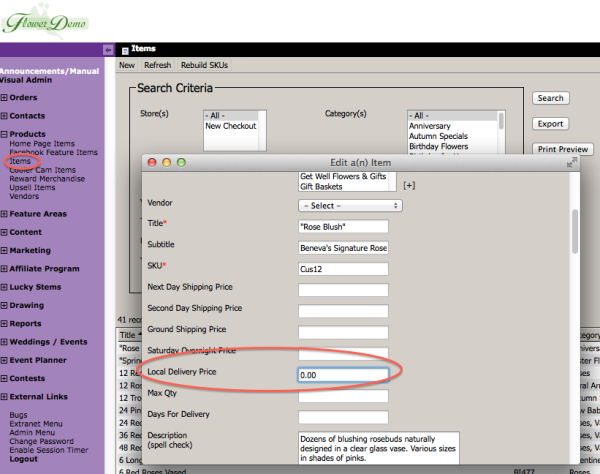
Item Local Delivery Amount – Update

The Items have been updated to allow you to specify a Local Delivery amount of $0.00. This would allow you to essentially exclude the Item from your standard Local Delivery fee. Any other delivery fees, such as an Upcharge Date or Upcharge Zipcode will still apply, it just allows you to set the base Local Delivery Charge to $0.00 for that item.

Item - Local delivery Amount

Minimalist Theme Color Variations

A month ago, we launched our newest Flower Manager theme, the Minimalist Theme. Its a more modern take on the traditional Flower Manager themes and today we are adding a wide variety of colors to choose from that will fit your unique style and needs. These add a level of flexibility and versatility to the Minimalist Theme unlike anything we’ve provided before. Below are examples of the nine new color variations now available in the Minimalist Theme.

Pink Theme

Pink Theme
The Pink Theme is perfect for celebrating Valentine’s Day and October to show your support for National Breast Cancer Awareness month. Also great for spring.

Continue reading

New FlowerManager Features and Minimalist Theme – Part I

We’d like to introduce a few new layout features along with a new “minimalist” theme. The new theme is really more than that… it’s a new design that has it’s own themes. So now you’ll have the traditional design with it’s themes, and the new modern/flat design with it’s theme’s.

We’re launching with a single theme but we’re releasing several new features to give you significant options in how your site looks and what features it has enabled, even using the traditional themes. Plus we’ve organized the “Wide Store Settings” to be much easier to use.

  • Minimalist Theme
  • New Wide Settings
  • New Full-Width Feature Areas
  • Fat Footer Toggle
  • Extra Ornamentation

You can also turn off Home Page Specials and/or Homepage Products depending on the layout you would like to use. I’ve provided some examples below of many of the different payouts you can use.

Continue reading

FlowerManager Updates – August 2013

Hello! Here is the latest list of new features and enhancements for your FlowerManager site. Many of these features work together to give you added flexibility in how you can use your site.

Manual Contacts Groups

You can now create groups in Manual Contacts. This will allow you to place individual submissions or import lists into various groups rather than everything just being put in the Manual Contacts. You can also send emails to one or more individual Groups now instead of the entire Manual Contacts list.

Continue reading

FlowerManager Updates: iPad Updates, Rush Delivery Blockout, Occasion Tweaks, Upsell Variation Images

iPad Updates

We made a few updates to accommodate changes to mobile safari on the iPad. The drop down navigation functions better and allows you to access the drop downs and still click the main navigation item as well. The tooltips on the Delivery Date calendar were interfering with selecting the date, requiring the user to touch once to see the tooltip with delivery charges and then again to choose that date before being allowed to continue. This was causing users to think they were stuck and could not continue past this screen. I removed the tooltip on the iPad so touching the date just selects it now. I also removed the “hover card” from the products. Before when touching the product it would start to show the hover card as it was navigating to the product, now it just takes you to the product a bit faster.

Continue reading

FlowerManager Updates: Reward Points and Coupons

Reward Points and Coupons

We’ve added the ability for you to restrict usage of Reward Points and Coupons on the same order. By default the system allows both to be used. There is a new setting “Points with Coupons?” in the Wide Store Settings, if you uncheck this option then there will be a note displayed to the user if they have Reward Points to add indicating that if they add reward points the coupon will be removed. This message only displays if they’ve already added a coupon to the order and have reward points to apply.

Continue reading

FlowerManager Updates – Phone Numbers, Facebook, After Hours Login and Charity Organizations

Phone Numbers

We’ve added a few extra phone number fields for the Cart, Event/Wedding Site and Mobile Site. If you enter a number for Mobile or Cart then it will use that number instead of your local or toll free numbers by default. If an affiliate or campaign is passed and they have a phone number they will still override these numbers in the same way it overrides your local / toll free number. However if a number is setup for the Wedding Site then that is the number that will appear there regardless of any affiliate or campaigns the user might have come from. You can set the Cart / Mobile phone numbers in Wide Store Settings and Event/Wedding site phone under Weddings – Settings.

Continue reading