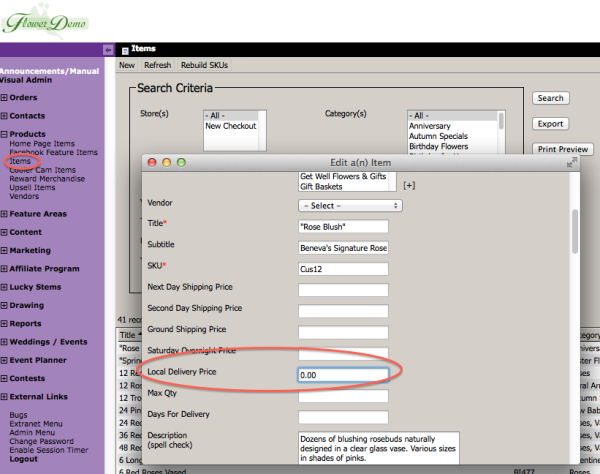
The Items have been updated to allow you to specify a Local Delivery amount of $0.00. This would allow you to essentially exclude the Item from your standard Local Delivery fee. Any other delivery fees, such as an Upcharge Date or Upcharge Zipcode will still apply, it just allows you to set the base Local Delivery Charge to $0.00 for that item.
Category Archives: FlowerManager CMS
Delivery Matrix – Updates Dec 2013
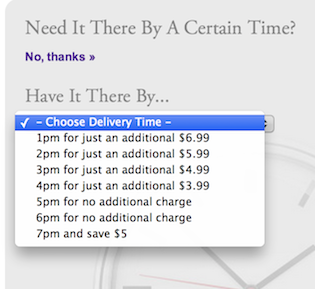
The purpose of this update was to help clarify to customers that they do not need to pay for a specific time unless they want a specific time. Some customers were confused by the choices with a dollar amount and were left still wondering when theirs would deliver and if they had to choose one of these options. Now you can enter $0 and it will show when they can expect delivery at no charge.
We’ve added the ability for you to allow for delivery at the specified time for no charge, or even offer a discount. If you enter 0 for the amount then it will offer them delivery at that time “for no additional charge” if you enter a negative amount (say -10) then it will offer delivery for that time “and save $10”. If you want that time to be unavailable for delivery then you leave the field blank.
Florist Product Search (Product Recipe)
We’ve add a new Florist Product Search feature to the website located at /floristProductSearch.cfm (ie. http://www.beneva.com/floristProductSearch.cfm). This search can be given to florists that you wire orders to so that they can look up your products and get detailed information that may not be available on the front-end of your site. It is not intended for customers. You can make a URL Alias if you would like to make it easier to find.(ie. http://www.beneva.com/FloristSearch)
Minimalist Theme Color Variations
A month ago, we launched our newest Flower Manager theme, the Minimalist Theme. Its a more modern take on the traditional Flower Manager themes and today we are adding a wide variety of colors to choose from that will fit your unique style and needs. These add a level of flexibility and versatility to the Minimalist Theme unlike anything we’ve provided before. Below are examples of the nine new color variations now available in the Minimalist Theme.
Pink Theme
The Pink Theme is perfect for celebrating Valentine’s Day and October to show your support for National Breast Cancer Awareness month. Also great for spring.
New FlowerManager Features and Minimalist Theme – Part I
We’d like to introduce a few new layout features along with a new “minimalist” theme. The new theme is really more than that… it’s a new design that has it’s own themes. So now you’ll have the traditional design with it’s themes, and the new modern/flat design with it’s theme’s.
We’re launching with a single theme but we’re releasing several new features to give you significant options in how your site looks and what features it has enabled, even using the traditional themes. Plus we’ve organized the “Wide Store Settings” to be much easier to use.
- Minimalist Theme
- New Wide Settings
- New Full-Width Feature Areas
- Fat Footer Toggle
- Extra Ornamentation
You can also turn off Home Page Specials and/or Homepage Products depending on the layout you would like to use. I’ve provided some examples below of many of the different payouts you can use.
SEO with Flowermanager and Wedding or Events Sites
There has been a lot of discussion recently in regards to the best practices of using Wedding or Event sites in conjunction with FlowerManager.
First off if you use the FlowerManager Wedding / Event site it is either hosted under your site at domain.com/events or under a separate domain of your choosing. There are pros and cons to consider having it set either way. We will specifically be focusing on SEO relevance and the blog portion in this post.
There are a few different scenarios we need to cover, the first being what we recommend the most for peak SEO performance as well as branding and user experience.
The Scenarios:
Delivery Matrix
The Delivery Matrix is intended to give you the opportunity to create multiple levels of Rush Delivery. It is based on the Address Type (residential, apt, business, etc.) the ZIPCODE and the time the customer is placing the order. You can create more than one Delivery Matrix.
Review Generator
The Review Generator is tool created to facilitate getting your customers to easily provide reviews on various websites across the Internet. The tool has a short survey at the beginning but is not intended as a replacement for in-depth surveys, it is intended to generate reviews.
Product Setup for SEO
Here is a quick reference on how to optimize your products for SEO. This should explain it in as little space as possible.
How To Setup and Manage Products
Below is a video explaining the setup of products.