Delivery Matrix – Updates Dec 2013

The purpose of this update was to help clarify to customers that they do not need to pay for a specific time unless they want a specific time. Some customers were confused by the choices with a dollar amount and were left still wondering when theirs would deliver and if they had to choose one of these options. Now you can enter $0 and it will show when they can expect delivery at no charge.

We’ve added the ability for you to allow for delivery at the specified time for no charge, or even offer a discount. If you enter 0 for the amount then it will offer them delivery at that time “for no additional charge” if you enter a negative amount (say -10) then it will offer delivery for that time “and save $10”. If you want that time to be unavailable for delivery then you leave the field blank.
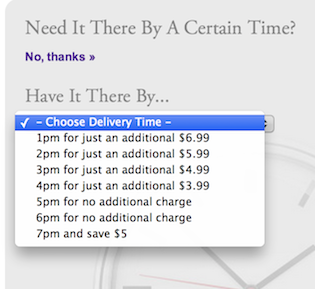
Delivery Matrix

FlowerManager Updates: iPad Updates, Rush Delivery Blockout, Occasion Tweaks, Upsell Variation Images

iPad Updates

We made a few updates to accommodate changes to mobile safari on the iPad. The drop down navigation functions better and allows you to access the drop downs and still click the main navigation item as well. The tooltips on the Delivery Date calendar were interfering with selecting the date, requiring the user to touch once to see the tooltip with delivery charges and then again to choose that date before being allowed to continue. This was causing users to think they were stuck and could not continue past this screen. I removed the tooltip on the iPad so touching the date just selects it now. I also removed the “hover card” from the products. Before when touching the product it would start to show the hover card as it was navigating to the product, now it just takes you to the product a bit faster.

Continue reading