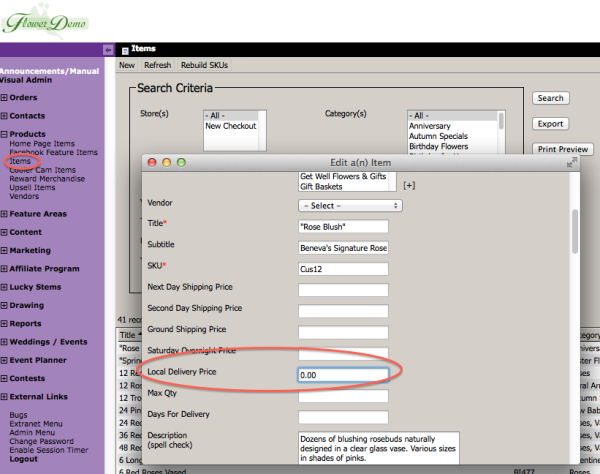
The Items have been updated to allow you to specify a Local Delivery amount of $0.00. This would allow you to essentially exclude the Item from your standard Local Delivery fee. Any other delivery fees, such as an Upcharge Date or Upcharge Zipcode will still apply, it just allows you to set the base Local Delivery Charge to $0.00 for that item.
Category Archives: Catalog
Florist Product Search (Product Recipe)
We’ve add a new Florist Product Search feature to the website located at /floristProductSearch.cfm (ie. http://www.beneva.com/floristProductSearch.cfm). This search can be given to florists that you wire orders to so that they can look up your products and get detailed information that may not be available on the front-end of your site. It is not intended for customers. You can make a URL Alias if you would like to make it easier to find.(ie. http://www.beneva.com/FloristSearch)
Product Setup for SEO
Here is a quick reference on how to optimize your products for SEO. This should explain it in as little space as possible.
How To Setup and Manage Products
Below is a video explaining the setup of products.
FlowerManager Updates – August 2013
Hello! Here is the latest list of new features and enhancements for your FlowerManager site. Many of these features work together to give you added flexibility in how you can use your site.
Manual Contacts Groups
You can now create groups in Manual Contacts. This will allow you to place individual submissions or import lists into various groups rather than everything just being put in the Manual Contacts. You can also send emails to one or more individual Groups now instead of the entire Manual Contacts list.
Norfolk Products
Here is a video explaining how to move your products.
FlowerManager Updates: iPad Updates, Rush Delivery Blockout, Occasion Tweaks, Upsell Variation Images
iPad Updates
We made a few updates to accommodate changes to mobile safari on the iPad. The drop down navigation functions better and allows you to access the drop downs and still click the main navigation item as well. The tooltips on the Delivery Date calendar were interfering with selecting the date, requiring the user to touch once to see the tooltip with delivery charges and then again to choose that date before being allowed to continue. This was causing users to think they were stuck and could not continue past this screen. I removed the tooltip on the iPad so touching the date just selects it now. I also removed the “hover card” from the products. Before when touching the product it would start to show the hover card as it was navigating to the product, now it just takes you to the product a bit faster.
Days For Delivery on Items
We’ve added the ability for you to limit the number of days into the future a particular item can be ordered. This overrides the Store Setting of Days For Delivery for the particular item.
