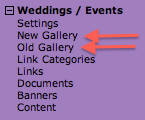
I wanted to take a moment to clarify how to use the galleries in the new site. If you have new larger images (1500 pixels or wider) you can setup the new galleries and when ready just check a box to use the new use galleries. However, if you don’t have large photos we have an alternative view that allows you to continue using your old galleries as long as you’d like.
Old Galleries (Not full-screen images)
If you don’t have full-screen images or just want to use your old galleries, we’ve moved the old gallery management into the new wedding section. Just use the “Old Galleries” link to continue to manage your old galleries and add new ones with small photos.
New Galleries (Full-screen images)
If you want to set up new galleries with large images, use the “New Gallery” link and then when they are all ready click the “Use New Gallery” button in Wedding Settings. Use whichever works best for you. If you are going to use the new galleries, we suggest you use beautiful photos by professionals rather than snapshots from a cell phone as they will be full screen and the quality will be noticeable. One last note… you can not take small images and make them larger. You need to the original to be large or they will look terrible.