Hello everyone,
I hope you’re off to a great start for Valentine’s Day. Below is a quick summary of the features, but please be sure to read the detailed explanations and watch the videos to be sure you fully understand how they work. If you have any questions about these new features feel free to give us a shout.
Direct Order Entry to RTI
Our system will now take orders from FlowerManager and place them directly into RTI requiring much less, if any, cleanup.
Local Only Rush Delivery
If it’s checked then Rush Delivery will only be offered for zip codes in your Local Zips list in Store Settings.
Enhanced Block-out Dates
When setting up a blackout date you may now choose if you want to block Local, Non-Local and/or Will Call for that date.
Free Delivery Coupons
There is now an option for Totally Free Delivery or Free Standard Delivery on coupons.
Visual Admin
We’ve added an image map to the admin screen to help you easily navigate to the most often changed areas of your site.
Sold Out
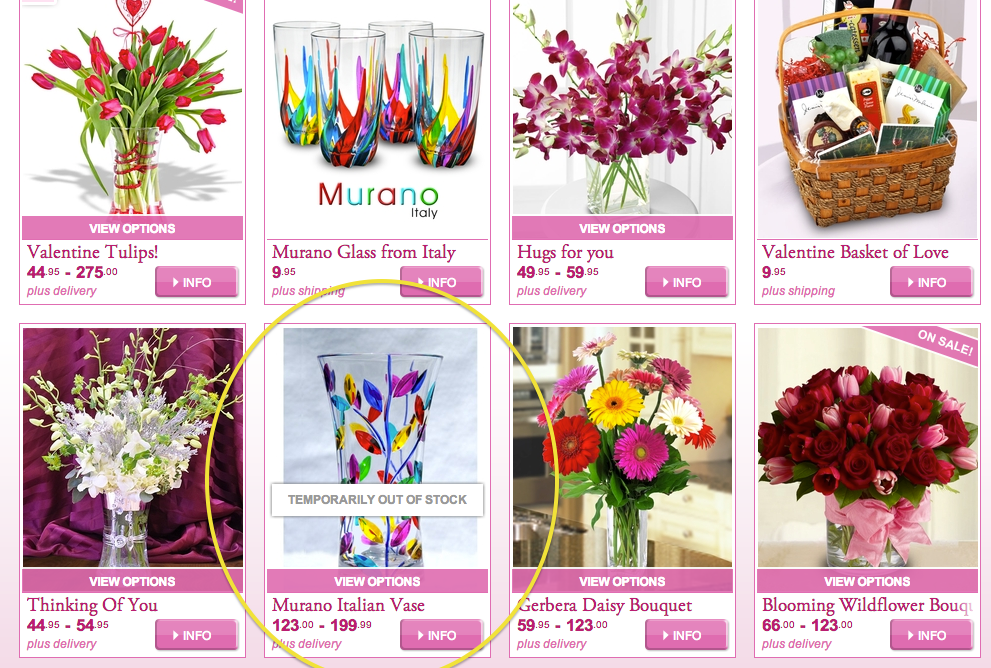
Items that are “Sold Out” are now flagged on the Category, Homepage, Recommended and Previously Viewed item lists now. Before it was just on the Product Detail page and there was no indicator in the product lists.
————————————————————————————————-
Direct Order Entry to RTI
We’ve been working with Teleflora for quite a while to create direct order integration into RTI and it is ready for deployment. Our system will now take orders from FlowerManager and place them directly into RTI requiring much less, if any, cleanup. We’ve built many failsafes into the system to account for issues on either our end or Teleflora’s. Due to the possibility of connectivity issues to your POS, if the connection is down for any reason, or orders are not being processed on that end, we’ll automatically move your orders back through Dove. In any case all orders will make it into your admin, as we store them there immediately. In the rare situation that both Dove and your POS are down, we’ll still have your oder, but not the credit card info. We DO NOT store credit card issues on your site for PCI compliance reasons and for your safety.
Visual Admin
We’ve added an image map to the admin screen to help you easily navigate to the most often changed areas of your site. Now when you log in to admin you’ll see a large image that looks like the homepage. If you hover over the various areas of the homepage you’ll get a tooltip telling you what it manages. Just click on the area of the homepage you’d like to manage and it will take you to that section of admin.
View Video: http://www.screencast.com/t/qVKSMWl5
Free Delivery Coupons
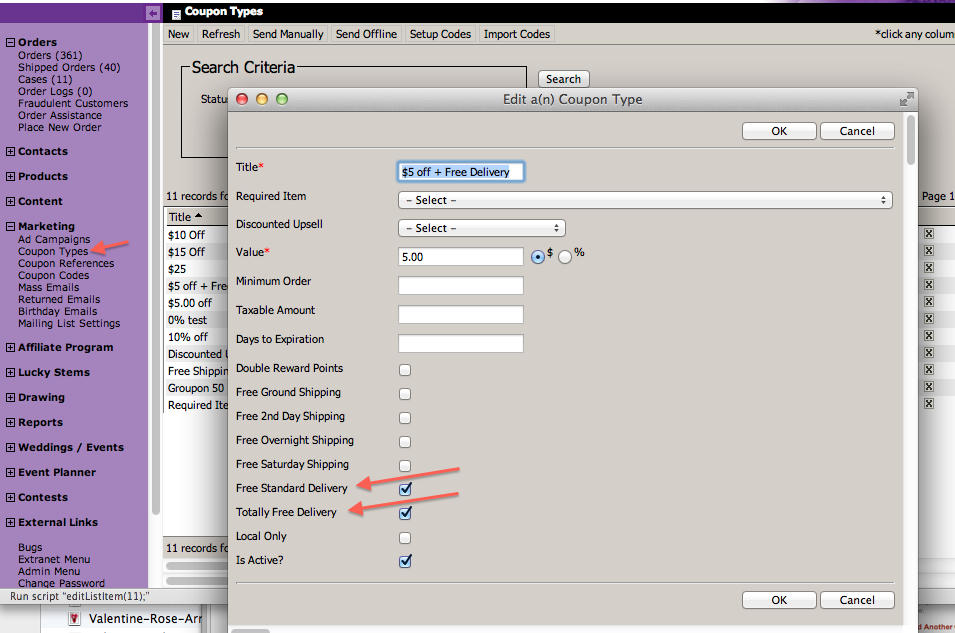
There is now an option for Totally Free Delivery or Free Standard Delivery on coupons.
If you select Totally Free Delivery then the Base Delivery Fee, Up-charge Dates, Up-charge Zip Codes, Affiliate Fees and Campaign Fees will all be removed for that order so there will be no line for Delivery / Service Charge on the Cart Review screen. This works in the same way we don’t charge and Delivery / Service Charges for a second item going to the same address, it just skips adding up any of the Delivery / Service Charges. The exception to this is if they choose Rush Delivery, that will be added and cause the Delivery / Service Charges screen to show and will be shown in the Charge Details hover element.
If you select Free Standard Delivery then only the Base Delivery Fee will be removed. Any Up-charge Dates, Up-charge Zip Codes, Affiliate or Campaign Fees will still be added. Because of this we’ve added a Charge Details hover element that shows on the Cart Review screen when you hover over the “Delivery / Service Charges” line on the order. This will show “Delivered FREE!” (or whatever you have in your Store Settings for Delivered Text) and then list any of the other up charges there, including Rush Delivery if they choose that. This means that if you have selected the “Combine Affiliate Fees” so that any Affiliate / Campaign Fees normally get combined into the delivery fee, we will now be displaying them as separate items on the Cart Review page because there is no delivery fee, this will only happen if they have added a Free Standard Delivery coupon, otherwise it still combines them on the Charge Details hover element. This way the user knows the Free Standard Delivery coupon worked because they see “FREE” there, but they’ll see the details of what, if any, additional charges there are for Up-charge Dates, Up-charge Zips, Affiliate and/or Campaign Fees and Rush Delivery.
Enhanced Block-out Dates
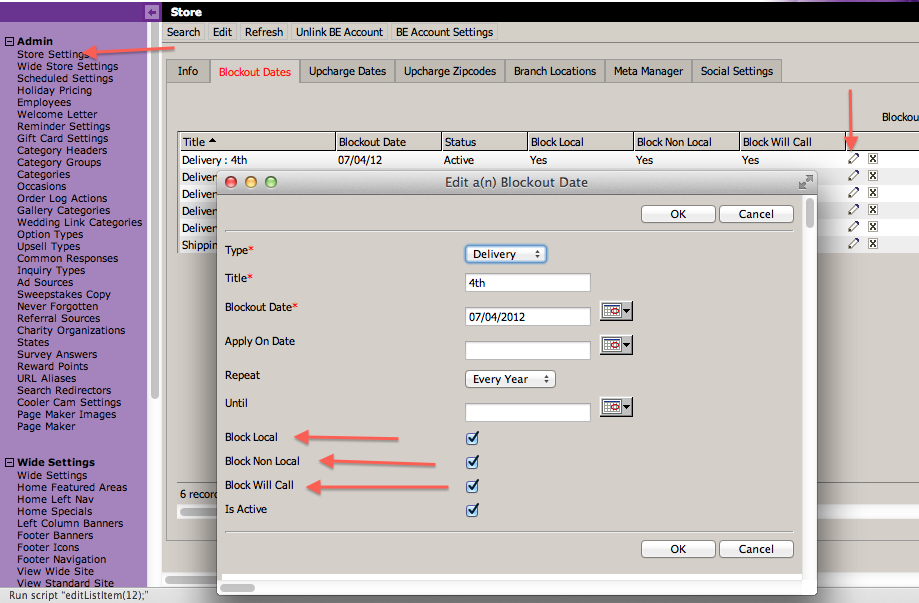
When setting up a blackout date you may now choose if you want to block Local, Non-Local and/or Will Call for that date. The default is all three, which is what all your existing blackout dates are set to.
When you setup a blackout date for Local then those zip codes in your Local Zips under Store Settings will not be able to order on that date. If you select Non-Local then anyone outside of those zip codes will not be able to order for that date. And if you select Will Call then they will not be able to order for Pick Up in your store on that date. This will allow you to stop taking outside orders on days like Valentine’s day, but still be able to take local orders, or vice/versa.
Local Only Rush Delivery
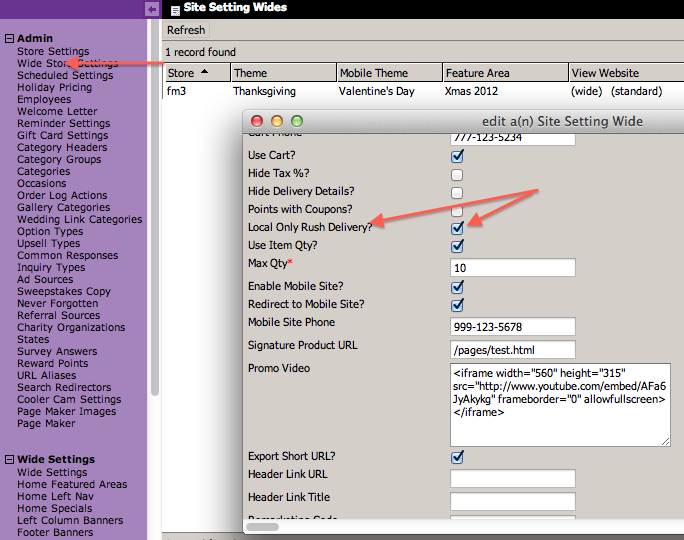
This is an option under Wide Store Settings. If it’s checked then Rush Delivery will only be offered for zip codes in your Local Zips list in Store Settings.
Sold Out
Items that are “Sold Out” are now flagged on the Category, Homepage, Recommended and Previously Viewed item lists now. Before it was just on the Product Detail page and there was no indicator in the product lists.