
I’ve created a new video on the “Affiliates’ tool to help everyone get a better understanding of how that system works so you can make the most of it. It’s a powerful tool, but you’ll need to make a plan to get affiliates and do some setup to make the most of it. If you would like us to make graphics and banners for you please get in touch with Kelli and we’ll get it planned.
I’m attaching a direct link to the video but it, as well as all the others, are available from the “External Links” section of your admin. Just expand that section and you’ll see a link to the training videos.
The Affiliate URL Structure
Affiliates have the means to log in to their account area to get links and embed codes to products that already have their URL setup automatically. The affiliates login page is located at “http://Your_Domain.com/affiliates/index.cfm”.
You can link to anything in FlowerManager with an affiliate link once you know how to structure that URL. It’s pretty easy. Let me explain how to determine the Affiliate ID and create a link to anything you would like to link to. The first thing you’ll need is the Affiliate ID. That can be found in the Affiliate section of the admin in the main list. See attached image.
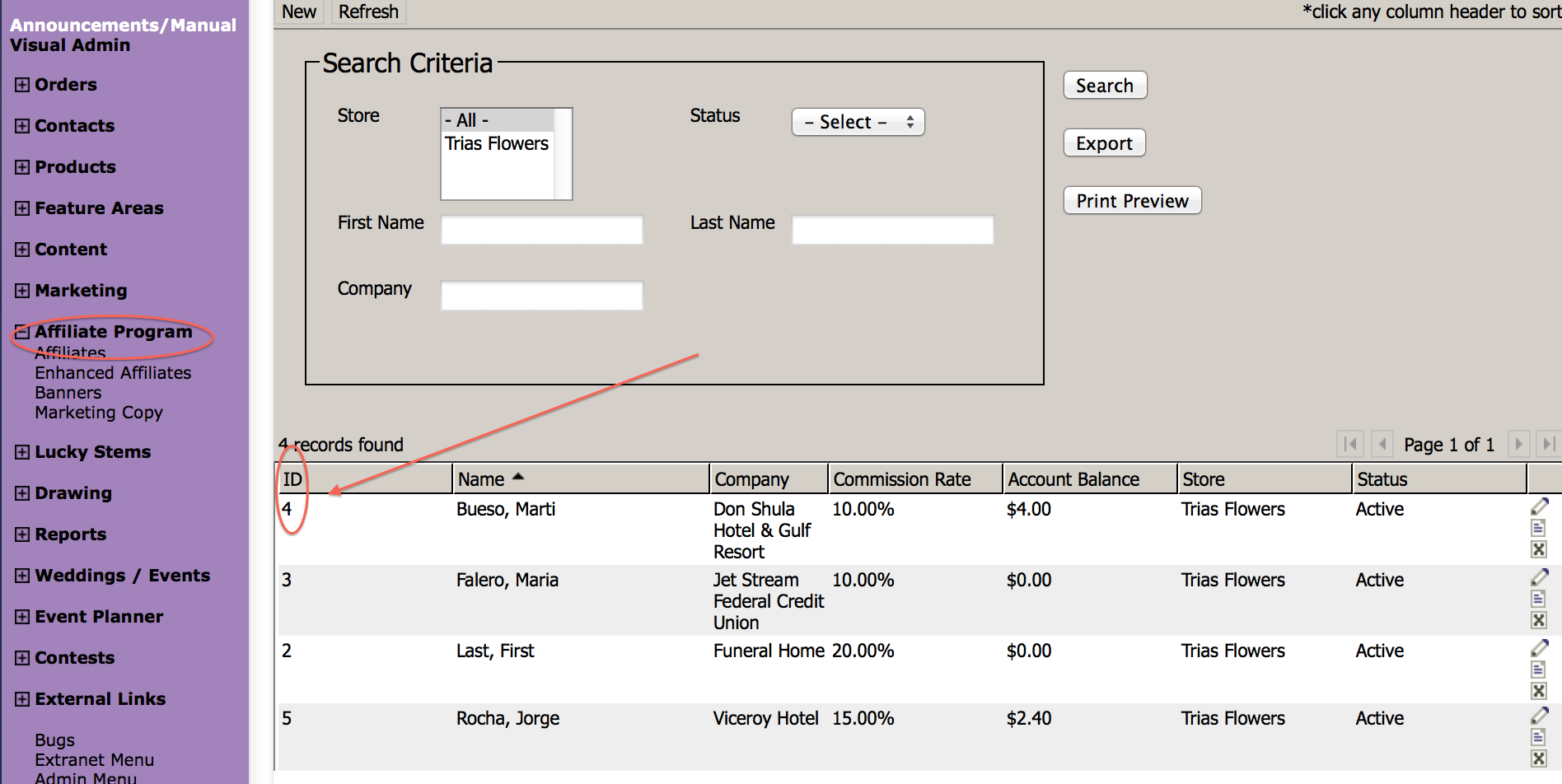
Next you’ll need to create a URL with that ID. To create the link you use “?affID=[the affiliate ID]”. So the URL structure should look like this if their Affiliate ID is “4”. “domain_name.com/index.cfm?affID=4”.
If there is another section you’d like to link to rather than the home page you would basically use the same structure… just make sure there is no more than one “?” in the URL. If there is already a “?” you’ll need to replace the one on the affID with an “&”. Here are a few examples… notice the difference based on the rest of the URL structure.
http://dev.flowermanager.com/productCategory.cfm?catID=1442&affID=4
http://dev.flowermanager.com/grp-valentines-day/valentines?affID=4
http://dev.flowermanager.com/productCategory.cfm/catID/1484/?affID=4
Training Videos
You can always access training videos via the External Links… Help Videos section of your admin. See below.
